 why
whyFor anyone coding with AI agents
Undo any AI change.
Know why it happened.
whydid records every change your coding agent makes, with your prompt and the agent’s own explanation. When something breaks, it finds the change that did it and takes back just that one, even fifty changes later.
Runs 100% on your machine · no API key · with or without git
$
Sound familiar?
Coding agents are fast. Cleaning up after them isn’t.
“It worked an hour ago. The agent made twenty changes since. Which one broke checkout?”
whydid bisectRuns your tests against past versions and names the change that broke them, with the prompt and the agent's reply.
“The agent rm -rf'd a folder. Rewind can't bring it back, and it was never committed.”
whydid undoEvery file change is recorded, whatever made it. Undo that one change and the folder comes back, everything newer stays.
“Two hours of agent work to commit, and I can't explain half of what it did.”
whydid summaryWrites the commit message from what you asked and what the agent said it did. Or a write-up for the PR.
| git | Your agent’s rewind | whydid | |
|---|---|---|---|
| Undo one prompt's changes, keep the rest | — | Only back to a point | ✓ |
| Catches rm, mv, sed -i, subagents, your own edits | Only what you commit | — | ✓ |
| Survives closing the chat or switching agents | ✓ | — | ✓ |
| Remembers why: your prompt and the agent's reply | — | While the chat lasts | ✓ |
| Finds the change that broke your tests | With commits & git bisect | — | ✓ |
| Works before you've committed anything | — | ✓ | ✓ |
whydid runs alongside git, not instead of it. Commit like you always do.
The dashboard
Not a terminal person? You never have to be.
whydid daemon start opens a dashboard in your browser, on your own machine. Everything the commands do is a click away: see, undo, find what broke, write it up.
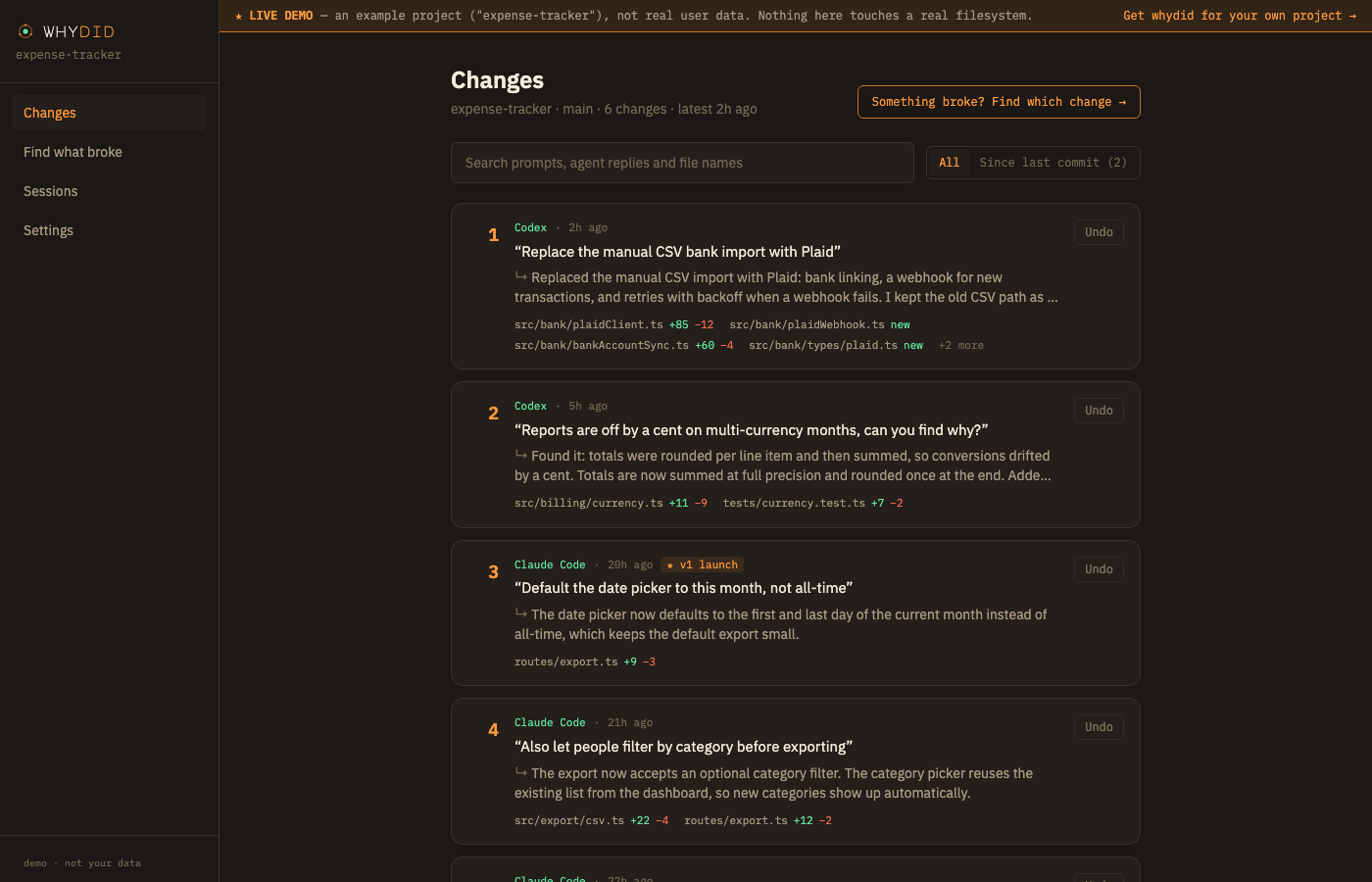
Every change, in plain words
Each prompt you gave, what the agent said it did, and the files it touched. Search it, filter to what changed since your last commit, and undo any one with a click.
Works with your agent
Whatever writes your code, whydid keeps it undoable.
whydid watches your project’s files, so every change is recorded no matter which tool made it. With the agents below it also keeps your prompt and the agent’s own explanation on each change.
- ✓ Every change recorded & undoable
- ✓ Your prompt on each change
- ✓ The agent’s own reply
Automatic — whydid reads its local session.
- ✓ Every change recorded & undoable
- ✓ Your prompt on each change
- ✓ The agent’s own reply
One command adds its hooks; approve them once with /hooks.
- ✓ Every change recorded & undoable
- ✓ Your prompt on each change
- ✓ The agent’s own reply
One command adds its hooks; trust the workspace when asked.
And everything else
Other agents, editor assistants, scripts and your own hands: every change is recorded, diffable and undoable. Find what broke works too. They just don’t come with a prompt attached.
The workflow
Two commands to set up. Two to get out of trouble.
No new workflow to learn and nothing to remember to do. It sits in the background until the moment you need it.
Set it up once
Takes a snapshot of the project in about a second. It writes nothing into your repo — no hooks, no config files, no .gitignore edits. Its own data lives in .whydid/, which ignores itself.
Let it watch
Then just code with your agent. Claude Code is picked up automatically — each prompt and Claude’s own reply land on the change it caused. For Codex or Cursor, run whydid init --agents once, then approve the hooks (/hooks in Codex; trust the workspace in Cursor).
Find what broke
Runs your tests against past versions — in a scratch copy, never your files — and names the change that broke them, with your prompt and the agent's reply. Or browse everything with whydid list.
Take back just one
Puts that change's files back how they were. It warns you first if a newer change touched the same files, and saves your current state before it touches anything — so the undo can itself be undone.
Who it’s for
Whether you write the code or just describe it.
A safety net under your agent, in the repo you already have.
- Review exactly what each prompt changed, with its diff, before you commit.
- Bisect a regression across agent turns without making a single commit.
- Commit messages and PR write-ups from what was actually asked and done.
- Local only, no account, no server sees your code. Works next to git and your editor.
Build fast with AI, without being scared to touch what works.
- Something broke? One click finds the change that did it and puts it back.
- No git knowledge needed: every version is kept for you, automatically.
- See in plain words what the agent did and why, prompt by prompt.
- An agent session went sideways? Undo the whole session at once.
What you get
A safety net that explains itself.
The why, in the agent's words
Each change carries the prompt you typed and the agent's own closing reply — what it says it did and why. Captured, not guessed. No extra AI call, no API key.
Finds what broke it
whydid bisect runs your tests against past versions in a scratch copy and names the change that made them fail — a few test runs, even across hundreds of changes. Your files never move.
Undo one prompt — or a whole session
Take back what one prompt did and keep everything after it, or roll back an entire agent session that went down a rabbit hole. Your current files are saved first, so every undo can be undone.
Catches what rewind misses
rm -rf, mv, sed -i, subagents, your own edits, a different agent tomorrow — whydid watches the files, not one tool's edit log. Claude Code, Codex and Cursor prompts attach automatically.
Commit messages that say why
See exactly what changed since your last commit, prompt by prompt, and get the commit message written from it — or a PR write-up, or a brief for a fresh agent session.
Pay once
One license, yours for good. No subscription, no seats, no usage meter. Optional AI summaries run through your own Claude Code or Codex, no key needed.
Pricing
One price. Yours for good.
No subscription, no seats, no usage meter. Pay once and it’s yours.
Lifetime license
Cheaper than the hour you’d spend working out which AI change broke things. You only need that to happen once.
Secure checkout by Dodo Payments. Your key arrives instantly, by email and on screen.
Want to look first? Open the live demo.
Everything included
- ✓Every change recorded, from any agent or by hand
- ✓list, diff, undo — one prompt or a whole session
- ✓bisect: find the change that broke your tests
- ✓Commit messages and write-ups from your prompts
- ✓The agent's own explanation on each change, no API key
- ✓Local dashboard, unlimited projects and history
- ✓Two machines, works offline, all 1.x updates
Before you ask
The questions everyone asks first.
Your agent will break something this week. Be the one who can take it back.
Two commands to set up, then it runs quietly in the background until the moment you need it.